

How to Walk FurReal WalkALots Pets — Leash & Motion Guide for Smooth Movement
The FurReal WalkALots line brought a new level of movement to interactive plush pets, and walking them properly makes all the difference. Whether you’ve just unboxed a Bernedoodle or the Big Wags pup, understanding how to walk FurReal WalkALots pets ensures smooth, responsive motion and extends battery life.
We’ve helped thousands of families get the best from their WalkALots pets, and the most common question we hear is why the pet seems bouncy or jerky at first. The answer lies in leash tension, walking pace, and surface choice — all of which we’ll cover below.
Getting the Right Leash Tension Before You Walk
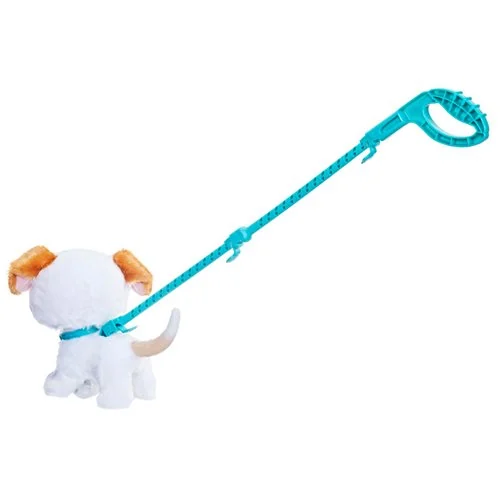
Before taking a step, check that the leash connector is clipped securely to the collar loop — it should click into place with no slack dangling below the pet’s chin. Hold the leash handle loosely in your palm, letting about 12-15 inches of lead extend between your hand and the pet’s neck.
Too much tension pulls the head upward and triggers the tilt sensor too early, causing the motor to stutter. Too little slack means the pet reaches the end of the lead abruptly and jerks to a stop. The sweet spot is a gentle curve in the leash with just enough give that the pet’s head stays level as it moves forward.
Testing Tension
Before walking, lift the leash handle to your waist height while the pet sits on the floor. The leash should form a shallow ‘J’ shape — not taut, not pooling on the ground. If you see the pet’s head tilt back even slightly, release another inch or two of slack.
Matching Your Pace to the Pet’s Motor Cycle
WalkALots pets use a programmed gait cycle — front legs step, pause, rear legs step — and your walking speed needs to sync with that rhythm. Start each walk by standing still and letting the pet take two full cycles (about four steps total) on its own.
Once you see the pattern, begin moving forward at roughly half your normal walking pace. The gait mechanism inside the pet is timed for a toddler’s natural stride, not an adult’s, so slowing down prevents the leash from yanking the pet mid-step.
If the pet starts to bounce or drag a paw, stop completely for three seconds to let the cycle reset, then resume at an even slower pace. The motor will recalibrate its sensors once it detects steady forward pull again.
Choosing the Best Walking Surface
Smooth, flat surfaces like hardwood, tile, or low-pile carpet give the best results. The rubber grips on the paw pads are designed for moderate friction — too slick (polished marble, wet vinyl) and the paws slide out, too grabby (shag carpet, outdoor pavement) and the motor labors against resistance.
We’ve found that the same surface types favored for other interactive dog toys work well here: clean, dry indoor flooring without rugs that bunch or catch. Outdoor use on concrete or asphalt drains batteries faster and wears down the paw grips within a few weeks of regular walks.
Avoiding Obstacles
Clear a path at least three feet wide before starting. The pet’s turning radius is wider than it appears, and brushing a table leg mid-step can trip the tilt sensor and stop the motor entirely. If you’re walking in a smaller room, straight lines work better than trying to navigate tight corners.
Troubleshooting Jerky or Stopped Movement
If your pet stops mid-walk or moves in short bursts, the issue is usually one of three things: low battery charge, uneven leash pull, or debris in the wheel wells. Check the battery compartment first — WalkALots motors draw significant current under load, and anything below half charge can cause stuttering even if the sound effects still play.
Next, inspect the wheels on the underside of the rear paws. Hair, dust, or carpet fibers wrap around the axle over time and create drag. A quick wipe with a dry cloth every few walks prevents buildup. For deeper maintenance tips on keeping interactive pets running smoothly, regular cleaning of moving parts makes a noticeable difference in long-term performance.
Finally, try releasing the leash entirely and letting the pet walk freely for a few steps. If it moves smoothly on its own but jerks when you hold the lead, your hand tension is the culprit — practice a looser grip and let the pet lead you rather than guiding it.

Walking Multiple Pets Together
The WalkALots collection includes a connectible leash system that lets you walk two or three pets side by side. When using the connector links, keep all leashes at equal tension and walk even slower than you would with one pet — the motors don’t communicate with each other, so syncing their steps requires you to set a pace both can follow.
Position faster-stepping pets (usually the smaller WalkALots models) on your left and slower ones on your right. This naturally balances the pull and prevents one pet from dragging the other. If one pet stops, the others will too within a step or two, so treat the whole group as a single unit and pause together whenever one needs to reset.
Making Every Walk Smooth and Fun
Walking your FurReal WalkALots pet becomes second nature once you dial in the right leash tension, pace, and surface. The key is letting the pet’s motor set the rhythm rather than trying to steer it like a remote-control toy.
With fresh batteries, a clean walking path, and a loose grip on the leash, you’ll see the smooth, lifelike gait these pets were designed for. We’re here to help if you run into any issues — our team knows these pets inside and out, and we’ve walked every model in the lineup more times than we can count.
Notes
Bouncing happens when you walk too fast or pull the leash taut. Hold the leash loosely with 12-15 inches of slack, and move forward at about half your normal walking speed.
Let the pet complete two full step cycles on its own before you start moving. If bouncing continues, stop for three seconds to let the motor reset, then resume at an even slower pace.
Yes, but stick to low-pile or flat-weave carpet. High-pile or shag carpet creates too much resistance and drains the battery quickly.
The rubber paw grips work best on smooth indoor surfaces like hardwood or tile. Outdoor pavement wears down the grips and shortens the life of the motor.
The most common causes are low battery charge, uneven leash tension, or debris in the wheel wells. Replace or recharge the batteries first, then check the wheels on the rear paws for hair or dust buildup.
If the pet walks smoothly without the leash but stops when you hold it, you’re pulling too hard — loosen your grip and let the pet set the pace.
Expect 15-20 minutes of active walking on fresh batteries. Walking on smooth surfaces at a steady pace maximizes battery life, while frequent starts and stops or rough terrain drains power faster.
If the pet starts moving slower or making quieter sounds, it’s time to replace the batteries even if they’re not completely dead.
No, the WalkALots leash connector is designed specifically for the collar loop on WalkALots models. Other FurReal lines use different attachment systems or no leash at all.
If you want to walk multiple pets together, make sure all of them are from the WalkALots collection and use the official connector links sold separately.
Turn the pet off using the switch on the underside, and store it in a cool, dry place away from direct sunlight. Remove the batteries if you won’t be using it for more than a week to prevent corrosion.
Keep the leash clipped to the collar loop to avoid losing the small connector piece. Wipe the paw grips with a dry cloth after each walk to remove dust before storing.