
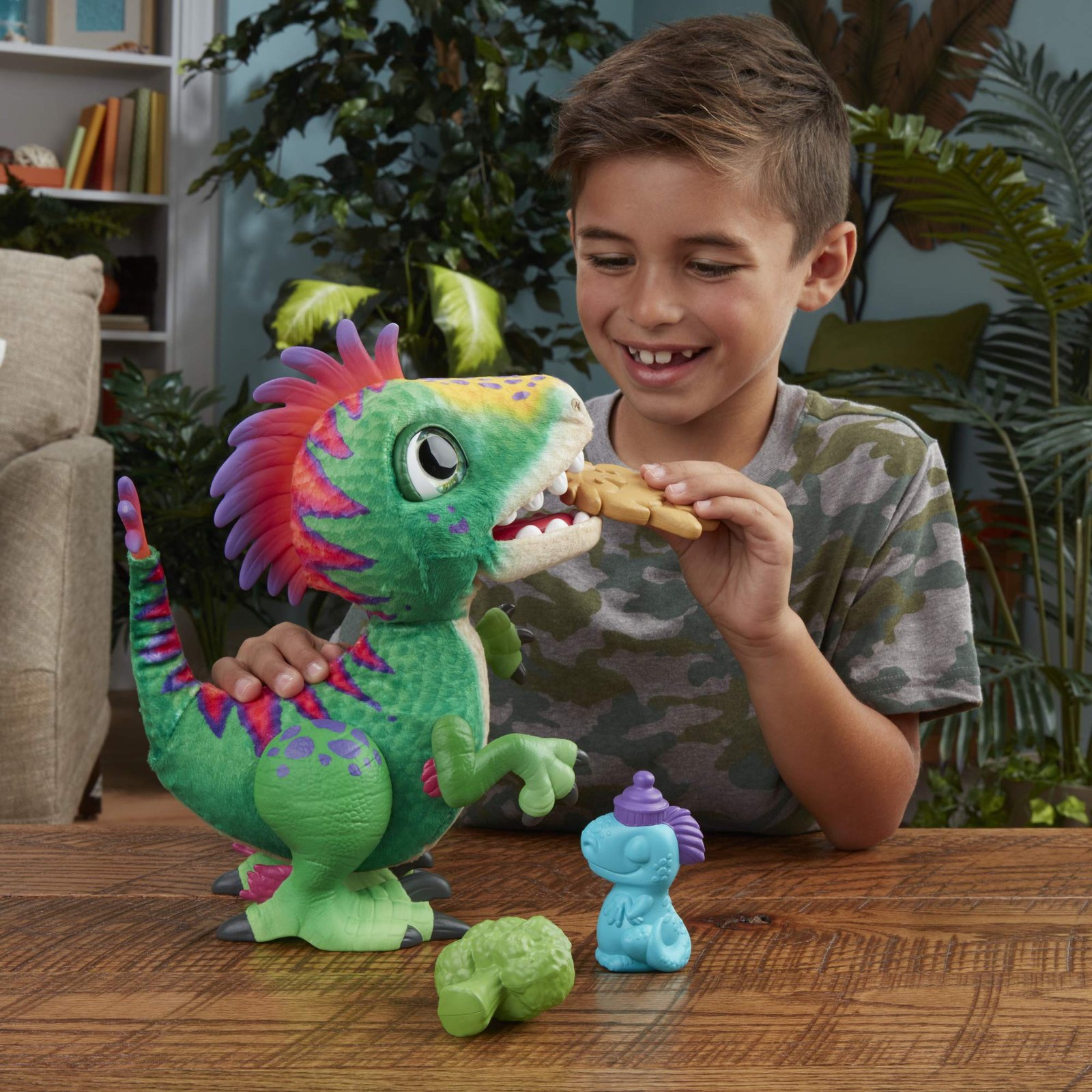
How to Feed FurReal Munchin’ Rex and Other Interactive Dinosaurs — Complete Feeding Guide
FurReal interactive dinosaurs like Munchin’ Rex and Torch bring prehistoric play to life with feeding features that respond to your child’s actions. Knowing how to feed FurReal dinosaur toys properly unlocks their full range of sounds, movements, and personality — but the feeding mechanism can be confusing at first.
We’ve designed our dinosaur lineup to reward curiosity and gentle interaction. This guide walks you through the feeding process step-by-step, explains what triggers different reactions, and shares tips to keep playtime engaging for years to come.
What Comes in the Box — Food Pieces and Accessories
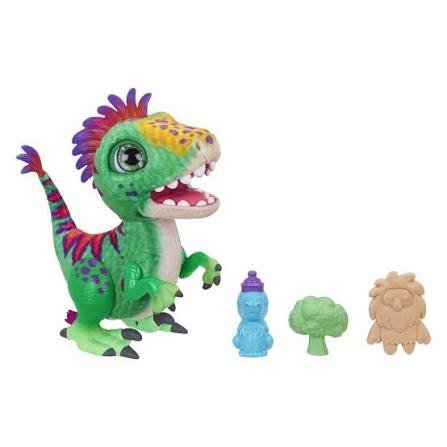
Every FurReal dinosaur arrives with its own set of feeding accessories tailored to that model’s design. The Munchin’ Rex dinosaur includes three plastic treat pieces shaped like caveman snacks, while Torch the dragon uses flame-shaped food tokens that slide into his mouth sensor.
These pieces are molded from durable ABS plastic and sized to prevent choking hazards, meeting CPSC toy safety standards for interactive play patterns. Check your packaging insert for the exact count — most models include at least three food pieces, and replacement accessories are available if any go missing during play.
Store the feeding pieces in a small container between play sessions so they don’t end up under the couch. The sensor technology works best when the plastic surface stays clean and free of sticky residue.
Activating Feeding Mode — Sensors and Trigger Points
FurReal dinosaurs use touch-sensitive panels and motion sensors to detect when food is approaching. On most models, you’ll find the main sensor just inside the mouth opening — a small raised contact point that registers when a treat piece presses against it.
Turn on your dinosaur using the power switch located on the belly or back leg area. Wait for the startup sound sequence to finish before attempting to feed. Some models enter feeding mode automatically when powered on, while others require you to press a button on the back or tail to activate hunger mode.
How the Sensor Reads Each Feeding
When you slide a treat piece toward the mouth, the internal contact closes a circuit that triggers pre-programmed eating sounds and jaw movements. Removing the piece resets the sensor for the next feeding cycle. The Torch dragon adds a light-up element to this sequence, with LEDs that glow brighter as the treat moves deeper into the mouth cavity.
If your dinosaur doesn’t respond, press the treat more firmly against the sensor or wiggle it gently side to side until you hear the activation chime.
Step-by-Step Feeding Process
Start with your dinosaur powered on and resting on a flat surface to prevent tipping. Hold one food piece by the edges — avoid covering the flat face that touches the sensor.
Slowly guide the treat toward the dinosaur’s open mouth until it makes contact with the sensor panel inside. You’ll feel a slight resistance when the piece reaches the trigger point. Hold it there for one to two seconds while the eating animation plays — chomping sounds, head bobbing, and sometimes tail swishing depending on the model.
Withdraw the treat piece once the sound cycle completes. Many children enjoy the ritual of pretending to chew and swallow, so encourage them to pull the food back out slowly rather than yanking it away. This gentle handling extends the life of both the sensor contacts and the plastic treat edges.
Feeding Frequency and Play Rhythm
You can feed your FurReal dinosaur as many times as you like in a single play session. The toy doesn’t track satiety or refuse food after a certain number of feedings. Some models cycle through different reaction sounds randomly to keep the experience varied — your fifth feeding might trigger a burp sound instead of the standard chomp.
Different Reactions and Sound Modes
FurReal dinosaurs ship with multiple sound banks programmed into their memory chips. Feeding is just one interaction mode; petting the head, tail, or back can unlock roaring, purring, or playful growling depending on where you touch.
When you feed Munchin’ Rex specifically, he chomps with realistic jaw articulation and might tilt his head as if savoring the treat. Some feeding cycles end with a satisfied rumble, while others trigger a burp or a little roar of approval. The randomization algorithm prevents the exact same sequence from repeating every time, which keeps play feeling spontaneous.
Combining Feeding with Other Interactive Features
Try feeding your dinosaur immediately after a petting session to hear combo reactions. Many models recognize the pattern and layer a happy chirp over the eating sounds. Younger children love discovering these hidden response modes by experimenting with timing and touch combinations.
If your household includes other interactive pets from our collection, you’ll notice similar sensor logic across the lineup — once kids learn how to feed one FurReal creature, they can transfer that skill to cats, puppies, and fantasy animals with minimal relearning.

Troubleshooting Common Feeding Issues
If your dinosaur stops responding to feeding attempts, start with fresh batteries. Weak power causes intermittent sensor failures that look like broken mechanics but resolve immediately with a battery swap.
Clean the mouth sensor using a dry cotton swab to remove any dust or residue buildup. Avoid liquid cleaners, which can seep into the electronics. Gently rub the sensor contact point and the matching spot on each treat piece — sometimes a thin film of oil from repeated handling creates an insulating layer that blocks the circuit.
When the Sensor Stays Unresponsive
Check that the treat piece is oriented correctly. Most food tokens have a specific front and back; the flat printed side usually faces the sensor. Flip the piece over and try again if the first orientation doesn’t trigger a response.
If the dinosaur makes sounds when you pet it but ignores feeding, the mouth sensor wire may have come loose inside the shell. This requires opening the battery compartment and checking the visible wiring — look for any disconnected plugs near the power switch area. Our care guide includes photos of the internal layout for models where user-accessible connectors sometimes wiggle free during rough play.
Making the Most of Interactive Dinosaur Play
Feeding your FurReal dinosaur is designed to be intuitive enough for preschoolers yet engaging enough to hold attention through elementary school. The combination of tactile feedback, sound response, and visible movement creates a play loop that rewards gentle interaction and imaginative storytelling.
Keep the treat pieces together in a small bag, clean the sensors every few weeks, and replace batteries at the first sign of sluggish response. With that minimal care routine, your interactive dinosaur will chomp, roar, and react enthusiastically for years of prehistoric adventures.
Our dinosaur collection continues to expand with new species and features each season, but the core feeding mechanic remains consistent across the lineup — once your child masters one model, they’ve learned the essential skill for our entire FurReal family.
Notes
You can use any small, flat object that fits safely in the mouth opening and presses the sensor — a plastic coin, a clean bottle cap, or even your fingertip in a pinch. The sensor responds to contact pressure rather than a specific shape.
For safety and longevity, we recommend ordering replacement treat sets from our accessories catalog rather than improvising long-term. Third-party objects may have sharp edges that scratch the sensor housing.
No. The toys have no internal tracking of feeding frequency and won’t wear out from repeated use of the feeding feature. The sensor is rated for thousands of activation cycles.
The only wear concern is the physical plastic-on-plastic contact between the treat piece and the sensor panel. Clean both surfaces monthly to prevent micro-scratches that could eventually reduce sensitivity.
Random autonomous sounds are a designed feature, not a malfunction. FurReal dinosaurs occasionally make unprompted noises to simulate independent personality — a roar, a yawn, or a snacking sound even when no treat is present.
If the feeding sound plays continuously or loops without stopping, remove the batteries for 30 seconds to reset the microcontroller, then reinstall them. Persistent looping usually indicates a stuck sensor contact that needs cleaning.
On most models, all included treat pieces are functionally identical — they’re just molded in different shapes for visual variety. The sensor can’t distinguish between a bone-shaped piece and a plant-shaped piece.
Some special-edition dinosaurs include one unique treat with a magnet or RFID chip that unlocks a bonus sound, but this is clearly marked in the packaging if your model has it.
A few budget-line dinosaurs use touch-only sensors instead of insertable food pieces. For these, press your finger gently against the roof of the mouth or the inside cheek area while the toy is powered on. Hold for two seconds until the chomping animation starts.
The instruction sheet indicates whether your specific model uses treat pieces or touch feeding.
Most full-size FurReal dinosaurs require four AA alkaline batteries installed in the compartment under the belly. Smaller models may use three AAA cells instead.
All interactive features — feeding, petting, sound — draw from the same battery pack, so if feeding stops working but other sounds still play, the issue is the sensor rather than power supply.